When maintenance slips, the consequences compound quickly. Clogged filters strain motors. Dirty sensors trigger navigation failures. Tangled brushes miss floor contact entirely. What starts as a minor lapse in upkeep becomes an unplanned breakdown — and unplanned breakdowns in commercial facilities mean disrupted operations and costly repair bills.
This guide covers why maintenance matters for commercial-grade robots, the four types of maintenance every operator should understand, the warning signs to watch for, and a practical scheduling framework you can apply immediately.
Key Takeaways
- Consistent maintenance preserves suction power, navigation accuracy, and robot lifespan
- Know your four maintenance modes — preventive, corrective, predictive, and overhaul — so you apply the right response at the right time
- Missed coverage, navigation errors, brush wear, and recurring error codes all signal it's time to act
- Following a daily-to-periodic schedule stops most failures before they start
- High-usage commercial environments require more aggressive maintenance intervals than low-frequency deployments
Why Robot Vacuum Maintenance Matters
The Commercial Environment Problem
A robot vacuum running twice daily through a hotel lobby or hospital corridor accumulates debris, hair, and fine dust in brushes, filters, wheels, and sensors at a rate that would surprise most operators.
Hard floors in warehouses and manufacturing plants introduce abrasive particles that accelerate brush and squeegee wear. Retail environments add loose grit, packaging fragments, and foot-traffic debris to the mix.
None of this degrades performance in isolation. It compounds.
- Clogged filters reduce airflow and suction, forcing the motor to work harder
- Debris-packed wheels lose grip and surface contact, covering less floor per pass
- Dirty navigation sensors — even a light film of dust on a LiDAR unit — cause route errors, missed zones, and docking failures
- Tangled brush rolls reduce cleaning effectiveness and generate heat that shortens motor life
Tennant's AMR documentation states directly: "Dirty or damaged sensors = poor performance." In high-traffic commercial settings, sensor degradation doesn't just hurt cleaning coverage — it triggers repeat passes, extended cycle times, and avoidable service calls.
The Financial Case
The numbers behind proactive maintenance are well-established. Research cited by IFMA documents the following gains from strategic, proactive maintenance on commercial cleaning equipment:
- Reduces machine downtime by up to 50%
- Reduces breakdowns by 70–75%
- Increases productivity by 20–50%
The U.S. Department of Energy's Operations & Maintenance Best Practices Guide adds that preventive maintenance saves 12–18% over reactive costs — and predictive maintenance saves an additional 8–12% beyond that.

For a commercial operator running a fleet of autonomous robots, those percentages translate directly into protected capital and avoided replacement costs.
Types of Robot Vacuum Maintenance
No single maintenance approach works in isolation. Combining all four types keeps Gausium robots running reliably while controlling long-term service costs.
Preventive / Routine Maintenance
Preventive maintenance is scheduled, proactive upkeep performed regardless of whether an issue is visible. It covers emptying dustbins, cleaning brush rolls, wiping sensors, inspecting wheels, and checking charging contacts on a fixed schedule.
For lower-usage environments or newer units, this approach alone is often sufficient. Most manufacturers provide specific interval guidelines — following them consistently is the foundation of any maintenance plan.
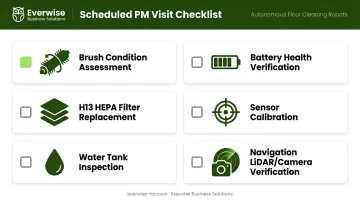
Everwise Business Solutions structures its scheduled preventive maintenance visits on a quarterly or semi-annual basis for deployed Gausium robots, with frequency scaled to usage intensity. Each visit covers:
- Brush condition assessment
- H13 HEPA filter replacement
- Water tank inspection
- Battery health verification
- Sensor calibration
- Navigation LiDAR/camera verification
Corrective / Reactive Maintenance
Corrective maintenance is action taken after a problem has already emerged: clearing a jammed wheel, replacing a failed brush motor, or restoring navigation after a sensor fault.
Reactive fixes typically cost more than prevention, involve downtime that disrupts facility operations, and often signal that routine maintenance was deferred too long. In commercial settings, a robot that stops mid-shift in a hotel lobby or hospital corridor is an operational failure, not a minor inconvenience.
Predictive / Condition-Based Maintenance
Predictive maintenance monitors performance data to anticipate when service is needed, before problems surface. Rather than replacing parts on a fixed schedule regardless of actual condition, condition-based maintenance uses real-time data to trigger service only when needed.
For Gausium robots, the Gausium Mobile App provides remote monitoring and status visibility across deployed units. Gausium's AI-driven monitoring capabilities (most fully developed in models like the Vacuum 40 v1.6 and Omnie) surface operational data that operators and technicians can use to time interventions accurately. This reduces unnecessary part replacements while catching real issues early, making it cost-effective for high-usage fleets.
Major / Overhaul Maintenance
Overhaul maintenance covers deep servicing beyond routine tasks: full component inspections, battery pack replacement, and mechanical renewal after extended operational periods. This type is triggered by accumulated operating hours or years of service, not by observable problems.
For commercial operators running multi-shift Gausium deployments, overhaul work warrants factory-trained technician support instead of in-house teams. Deep servicing without OEM parts and proper tooling introduces compatibility risks that can void warranty coverage and create harder-to-diagnose failures down the line.
Signs Your Robot Vacuum Needs Maintenance
Performance and Output Decline
The most common early indicators are easy to spot if you're paying attention:
- Noticeably weaker suction or reduced pickup on debris passes
- Missed spots or incomplete floor coverage during a cleaning run
- Mop streaks on hard floors the unit previously cleaned without streaking
- The robot taking significantly longer to complete the same area
These point to clogged filters, full dustbins, or brush rolls that have accumulated enough hair and debris to reduce surface contact. In high-dust commercial environments, filter clogging accelerates significantly — making consistent filter maintenance essential to sustaining suction performance.
Abnormal Behavior and Navigation Issues
Navigation errors are often maintenance problems in disguise:
- Frequent collisions with obstacles the robot previously avoided
- Getting "lost" or failing to complete mapped routes
- Inability to dock correctly after a cleaning cycle
- Shutting down mid-cycle without obvious cause
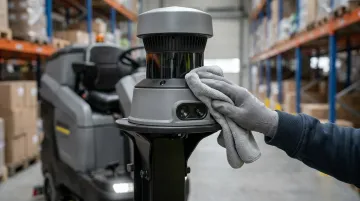
These behaviors typically trace back to dirty or obstructed sensors, debris-laden wheel wells affecting mobility, or degraded charging contacts that prevent full battery recovery. A clean microfiber wipe across navigation and obstacle-detection sensors often resolves issues that look like software failures.
Error Alerts, Visible Wear, and Recurring Issues
Persistent error codes and physical wear are the clearest signals that maintenance has fallen behind:
- Brush bristles that are visibly shortened, frayed, or missing sections
- Cracked, stiffened, or flat-spotted wheels
- Minor problems that keep returning after quick fixes
- Repeated fault alerts that clear temporarily but reappear within days
When the same fault reappears within hours of a reboot, a quick fix hasn't addressed the root cause. Recurring navigation errors, for instance, almost always trace back to unresolved sensor fouling rather than a software glitch.
Robot Vacuum Maintenance Schedule
Maintenance frequency depends heavily on usage intensity. A Gausium Vacuum 40 running a single daily pass through a small office needs far less attention than a Gausium Beetle running three shifts across a warehouse floor. Use this framework as a baseline and shorten those intervals based on your environment.
| Interval | Tasks |
|---|---|
| Daily / After Each Run | Empty the dustbin (if no auto-empty dock); rinse mop pads if the unit lacks a self-washing station; quick visual check for tangled debris on brush rolls |
| Weekly | Tap or brush out the filter to clear loose debris; detangle hair from main brush roll and side brushes; rinse and air-dry the water tank (if applicable) |
| Monthly / Every 1–2 Months | Wipe all sensors (navigation, cliff, anti-collision) with a dry or slightly damp microfiber cloth — no soaps or solvents; clean wheels and wheel wells of accumulated hair and grit; wipe charging contacts on both the robot and dock |
| Every 2–6 Months (or Per App Guidance) | Replace disposable filters (do not wash); deep-clean or replace washable filters; replace worn mop pads and brushes when app indicators or visible wear signal end of life; inspect and clean the auto-empty dock air path and mop-washing tray if applicable |
Commercial robotic floor-care guidelines generally tie replacement intervals to operating hours rather than calendar time: brush assemblies typically last 200–500 operating hours depending on floor abrasiveness and debris levels, while squeegee blades on scrubber-dryers require replacement every 100–300 hours based on floor texture and chemical exposure.
Scaling for Commercial Environments
In high-traffic commercial facilities — hospital corridors, hotel lobbies, school hallways, retail floors — compress the schedule:
- Weekly tasks move to every 2–3 days
- Monthly tasks shift to bi-weekly
- Filters and consumables should be monitored against operating hours, not just calendar time
Managing a multi-site Gausium fleet adds coordination complexity that a single internal schedule rarely covers cleanly. Everwise Business Solutions' Gausium-certified technicians provide structured preventive maintenance service across all Texas service areas — San Antonio, Austin, Dallas, Houston, and the Rio Grande Valley — under a single fleet maintenance contract. Emergency repair dispatch is also available for fleet customers under an active service agreement.
Conclusion
Maintenance isn't optional for commercial autonomous cleaning robots. In demanding environments where uptime directly affects facility hygiene and client-facing appearance, a structured routine is what separates consistent performance from avoidable breakdowns.
The right approach combines preventive habits on a defined schedule, predictive monitoring through the Gausium Mobile App, and timely replacement of consumable parts before they fail. Together, these protect the long-term value of your investment and keep facilities operating at the standard staff, clients, and visitors expect.
For Texas facilities looking to put these practices into a managed structure, Everwise Business Solutions offers scheduled PM contracts, OEM parts replacement, and on-demand repair support for the full Gausium lineup — so your robots stay productive without adding to your team's workload.
Frequently Asked Questions
Do robot vacuums need maintenance?
Yes. Robot vacuums require regular maintenance to sustain suction power, navigation accuracy, and overall cleaning performance. Neglecting upkeep leads to reduced efficiency, premature part failure, and repair costs that far exceed the price of routine care.
Should you run your robot vacuum every day?
Daily use is generally fine and beneficial for high-traffic commercial environments. That said, it increases the frequency at which maintenance tasks — dustbin emptying, brush detangling, and filter cleaning — need to be performed to keep performance consistent.
Should I leave my robot vacuum plugged in all the time?
Most commercial robot vacuums are designed to remain on their charging dock between runs without harming battery health. Follow your model's manufacturer guidance, as best practices vary by battery system.
How often should I clean my robot vacuum's filters and brushes?
Filters should be tapped clean weekly and replaced every 2–6 months depending on usage intensity. Brushes should be checked and detangled weekly. High-frequency commercial deployments typically benchmark brush replacement at 200–500 operating hours depending on floor conditions and soiling levels.
What happens if you don't maintain your robot vacuum?
Clogged filters strain the motor, dirty sensors cause navigation failures, and tangled brushes generate excess heat. The cumulative result is accelerated unit failure and higher total operating costs — both avoidable with a consistent maintenance program.
How long do robot vacuums last with proper maintenance?
Well-maintained commercial cleaning robots typically operate effectively for 5–7 years. Lifespan depends on usage intensity, environment, and adherence to the manufacturer's recommended maintenance schedule — including timely replacement of consumable parts like brushes, filters, and squeegees.