
The problem is that many facility managers treat maintenance as an afterthought. Without a structured plan, components degrade quietly: brush rolls wear down, sensors accumulate dust, batteries lose capacity. What starts as a minor dip in cleaning coverage can escalate into navigation failures, unplanned downtime, and repair costs that dwarf what routine upkeep would have cost.
This guide covers everything you need to maintain autonomous cleaning robots effectively — the four types of maintenance, early warning signs that service is due, a practical checklist organized by frequency, and a general schedule to follow.
Key Takeaways
- Skipping preventive maintenance leads to unplanned downtime, expensive repairs, and shortened robot lifespan — all avoidable with a consistent schedule
- The four maintenance types — preventive, corrective, predictive, and major overhaul — serve distinct roles and work best as a coordinated program
- Warning signs like reduced coverage, unusual noises, or navigation errors indicate maintenance is overdue
- A structured daily, weekly, monthly, and annual schedule keeps robots performing at peak efficiency
- Keeping a maintenance log and using your robot's fleet management software makes it easier to catch issues before they escalate
Why Preventive Maintenance for Cleaning Robots Matters
Autonomous cleaning robots operate continuously across demanding environments — hotel lobbies, hospital corridors, retail floors, school hallways. Any performance degradation in these settings directly affects cleanliness standards and, in regulated environments like healthcare, compliance too.
The Cost of Neglect
Components degrade whether you monitor them or not. Brush rolls collect hair and debris. Suction hoses clog. Sensors get coated with fine dust. Gausium's official maintenance guidance states directly that poorly maintained scrubbers lead to costly repair, downtime, or complete replacement — while regular maintenance reduces service and repair exposure and extends operating life.
The numbers back this up. NIST research on machinery maintenance cites manufacturer-reported outcomes of 35–45% reductions in downtime and 65–95% reductions in defects from improved maintenance programs. The DOE's Operations & Maintenance Best Practices Guide classifies reactive "run it till it breaks" maintenance as the highest-cost operating mode — driving unplanned downtime, overtime labor, and secondary damage.

More than 55% of maintenance activity across industries is still reactive. That means most facilities are paying a premium for breakdowns they could have prevented.
Safety and Compliance Considerations
In high-foot-traffic environments — hospitals, schools, transportation hubs — malfunctioning navigation sensors or obstacle detection failures create real safety risks. OSHA's technical guidance on robotics requires employers to conduct risk assessments covering both operation and maintenance stages. Compliance isn't optional.
For Gausium robots operating in these settings, neglected sensors don't just reduce cleaning accuracy. They affect:
- Collision avoidance — critical when navigating around patients, students, or guests
- Obstacle detection — degraded by dust buildup on 3D depth cameras and proximity sensors
- Compliance documentation — sensor validation logs support regulatory audits in healthcare and institutional settings
Regular sensor cleaning and verification protects people, not just performance.
Types of Maintenance for Cleaning Robots
Not all maintenance serves the same purpose. The right approach depends on the robot's operating hours, environment, and current condition. Here are the four main types.
Preventive (Scheduled) Maintenance
Preventive maintenance is proactive — it's scheduled upkeep performed before problems arise. For cleaning robots, this includes:
- Cleaning brush heads and clearing debris from suction inlets
- Emptying dust bins and dirty water tanks
- Wiping obstacle detection sensors and cameras
- Checking battery health and dock connections
- Updating navigation maps after layout changes
- Replacing consumables (filters, brushes) per manufacturer intervals
For robots operating in standard environments with moderate daily use, following manufacturer-recommended intervals is typically sufficient. The Gausium Scrubber 75 manual specifies roller brush and disc brush replacement at 300 hours or 3 months, and filter element replacement at 100 hours or 3 months — specific benchmarks that make interval planning straightforward.
Corrective (Reactive) Maintenance
Corrective maintenance kicks in after something fails — a blocked suction path, a crashed navigation map, a component that stops functioning. It's unavoidable, but over-relying on it is expensive. Unplanned repairs mean emergency technician calls, extended downtime, and the risk of secondary damage to other components.
Facilities running Gausium autonomous cleaning robots in Texas can work with Everwise Business Solutions, whose technicians provide corrective service when issues arise. Consistent preventive maintenance reduces how often that's necessary — but having a reliable service contact on file shortens downtime when it is.
Predictive (Condition-Based) Maintenance
Predictive maintenance uses real-time data — operational logs, usage metrics, onboard diagnostics — to anticipate maintenance needs before failure occurs. Rather than replacing a brush on a fixed schedule, you replace it when the data shows performance declining.
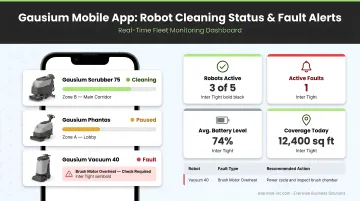
This approach is particularly relevant for high-usage deployments: airports, large hospitals, or manufacturing facilities running robots across multiple shifts. Gausium models like the Scrubber 75 and Vacuum 40 offer remote management via the Gausium Mobile App, allowing facility managers to:
- Monitor active cleaning tasks and coverage
- Receive status updates and fault alerts
- Review performance data to inform maintenance timing
With that data accessible remotely, maintenance decisions are based on actual wear — not guesswork.
Major Overhaul Maintenance
Overhaul maintenance is deep-service work — replacing aging motors, battery packs, worn brush assemblies, or outdated firmware. It's typically triggered by:
- Recurring performance problems that persist after routine maintenance
- Accumulated operating hours beyond normal wear thresholds
- Consistent underperformance against baseline cleaning benchmarks
- Battery capacity degraded below acceptable levels
The Gausium Scrubber 75 manual recommends that when maintenance requiring disassembly is needed, professional maintenance personnel should be contacted rather than attempting unauthorized repairs. Everwise Business Solutions stocks Gausium-compatible replacement accessories including brushes and advanced filters, and their technicians can assess when an overhaul is warranted.
How to Tell If Your Cleaning Robot Needs Maintenance
Performance or Output Changes
- Reduced coverage or missed zones — worn brush rolls, a blocked suction inlet, or an outdated navigation map that needs recalibration
- Incomplete routes on a full charge — battery degradation; the robot is consuming more energy per cycle than its baseline
- Longer-than-usual cleaning cycles — typically caused by dirty sensors, worn components forcing reroutes, or a navigation system that's lost accuracy
Unusual Behavior or Operation
- Grinding or scraping sounds — mechanical obstructions in brush assemblies or drive components
- Erratic navigation or sudden stops — sensor misalignment, software issues, or an emergency stop condition
- Frequent error code alerts — the robot's onboard system is flagging a condition that needs attention; ignoring these typically leads to more serious failures
According to Gausium's FAQ, the inability to perform auto-cleaning is commonly linked to sensors obscured by dust or debris. Caught early, it's a quick fix. Left alone, it can escalate into full navigation failure.
Visible Wear or Physical Indicators
- Frayed or tangled brush rolls (check for hair wrapped around roller brushes)
- Clogged filter bags or filter elements
- Water tank residue buildup or dirty water not draining properly
- Cracked components or loose connectors
- Corrosion on charging dock contacts
When error messages appear on the interface panel, log them and cross-reference the manufacturer's error code documentation for your specific model before attempting any fix. This applies especially to alerts related to sensors, mapping, or hardware components.
Increased Resource Consumption
A robot that's no longer performing at baseline often shows it through resource patterns before anything else. Watch for:
- More frequent dock returns before a route is complete
- Increased manual interventions to finish a cleaning cycle
- Cleaning logs showing longer run times with no route changes
These are typically the earliest indicators that maintenance is due, and the easiest ones to miss without regular log reviews.
Robot Preventive Maintenance Checklist & Schedule
Maintenance frequency should be guided by the manufacturer's specifications first, then adjusted based on operating hours, environment, and floor surface conditions. High-usage deployments (hospitals, hotels running multiple shifts) need more frequent checks — particularly for brush rolls, sensors, and batteries. Standard office or classroom environments can safely follow manufacturer intervals.
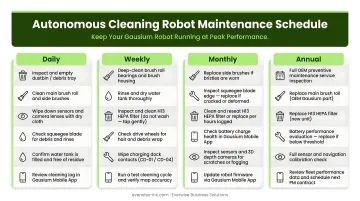
The table below outlines recommended task intervals — use it as your baseline, then adjust based on your facility's usage intensity.
Maintenance Frequency Table
| Frequency | Key Tasks |
|---|---|
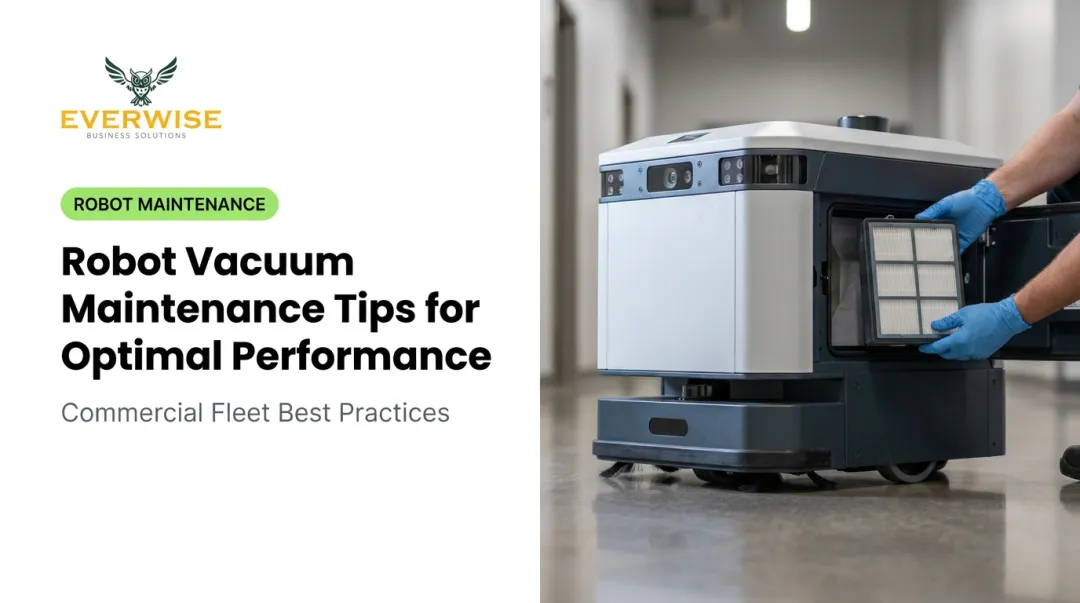
| Daily / Per Use | Empty dust bin and dirty water tank · Inspect brush rolls and suction inlet · Wipe obstacle sensors and cameras · Confirm correct docking and battery level · Check interface panel for error alerts |
| Weekly | Clean HEPA/air filtration unit · Inspect dock contacts for corrosion · Review app logs for route anomalies · Remove and clean roller and side brushes · Flush sewage suction pipe · Check exterior for physical damage |
| Monthly / Quarterly | Inspect cables and connectors for wear · Test obstacle sensors and 3D navigation cameras · Check brush motor performance; replace worn brushes (Scrubber 75: every 300 hours or 3 months) · Update navigation maps if layouts changed · Verify software and firmware versions · Test emergency stop and safety sensors · Run a full battery charge-and-discharge cycle |
| Annual / Long-Term | Replace battery pack if capacity has degraded · Inspect drive wheels, motors, and internal components · Run full software diagnostics and recalibrate all sensors · Replace filters, brushes, and consumables per manufacturer cycle · Have a technician assess components for overhaul |
Usage-Context Notes
High-usage environments (hospitals, hotels, transportation hubs):
- Check brush rolls and sensors more frequently — potentially every shift in environments with heavy debris
- Monitor battery performance weekly rather than monthly
- Review cleaning logs daily for route anomalies
Standard-use environments (offices, classrooms):
- Manufacturer intervals are generally sufficient
- Monthly checks can replace some weekly tasks during low-activity periods
- Still maintain daily bin emptying and sensor wipes
The Gausium Vacuum 40 maintenance guide specifies these consumable replacement intervals under standard operating conditions:
- Air filter — replace once per month
- Dust bag — replace once per quarter
- Roller brush — replace every six months
Always verify these intervals against your specific model's documentation, as heavier usage may require earlier replacement.
Conclusion
Preventive maintenance isn't optional — it's the foundation that keeps autonomous cleaning robots delivering consistent results, shift after shift. A documented maintenance plan protects the robot's mechanical and electronic components, sustains cleaning performance, and controls total cost of ownership over the robot's life.
The right approach combines routine scheduled upkeep, early warning recognition, and periodic deep-servicing. Reactive repairs cost more in downtime, parts, and shortened equipment life than any scheduled service visit ever will.
Facility managers in Texas operating Gausium autonomous cleaning robots can contact Everwise Business Solutions for scheduled maintenance, service visits, and technical support. Reach them Monday through Friday, 9:00 AM to 6:00 PM:
- Phone: 210.884.0559
- Email: german.zavala@everwise-inc.com
Frequently Asked Questions
What are the 4 types of preventive maintenance?
The four types are: preventive (scheduled upkeep before problems arise), corrective (reactive repairs after failure), predictive (data-driven maintenance based on performance metrics), and major overhaul (deep-servicing and part replacement). Most robots benefit from all four, with preventive maintenance as the baseline.
How often do robots need maintenance?
Daily checks, weekly inspections, and annual overhauls are standard — but frequency depends on usage intensity and environment. A robot running multiple shifts in a hospital needs more frequent attention than one used intermittently in a small office. Always treat the manufacturer's recommended intervals as the primary guide.
What happens if you skip preventive maintenance on a cleaning robot?
Skipping maintenance accelerates component wear, degrades cleaning performance, and increases the likelihood of navigation errors and unplanned downtime. Repair costs from reactive failures exceed what routine maintenance would have cost — and the downtime compounds the operational impact.
Can autonomous cleaning robots detect when they need maintenance?
Many modern robots, including Gausium models, include onboard diagnostics that flag errors and performance anomalies via the interface panel and mobile app. These alerts are useful early warnings, but they should supplement a structured manual maintenance schedule rather than replace it.
How long do autonomous cleaning robots last with proper maintenance?
Consistent maintenance extends operating life and keeps robots working at peak performance, though published lifespan figures vary by model and usage. Battery care has the most direct impact on longevity — commercial-grade lithium-ion batteries are typically rated for 2,000-plus charge cycles, and proper maintenance helps you reach that full rating.
What are the most important daily maintenance checks?
The most critical daily tasks are emptying the dust bin and water tank, wiping obstacle detection sensors and cameras, checking that the robot docked and charged correctly, and reviewing the control panel for any active error alerts before the next cleaning cycle begins.