Introduction
A robotic floor scrubber is a serious capital investment — one that's supposed to reduce labor costs, maintain consistent cleaning standards, and pay for itself over several years. Structured maintenance is what protects that investment. Without it, that ROI promise erodes fast.
The consequences show up quickly: missed cleaning zones, streaking floors, sensor failures that cause navigation errors, and eventually unplanned downtime that forces staff back to manual cleaning. According to NIST, facilities that rely primarily on reactive maintenance experience 3.3 times more downtime than those using preventive strategies.
This guide walks through the four maintenance types every program should include, early warning signs to catch before they become failures, and a complete scheduling framework from daily checks through annual overhauls. Where relevant, it includes specific guidance for Gausium autonomous scrubbers like the Scrubber 75 — the models Everwise Business Solutions deploys and supports across Texas.
Key Takeaways
- Maintenance runs on five intervals — daily, weekly, monthly, quarterly, and annually — each targeting different components
- Sensors, cameras, brushes, squeegees, water tanks, and batteries are the components that need the closest attention
- Preventive maintenance consistently costs less than emergency repair or unplanned downtime
- Gausium's Smart Cloud Platform delivers real-time diagnostics, so you can catch problems before they escalate
- Early warning signs include streaking floors, abnormal sounds, recurring error codes, and faster battery drain
Why Maintenance of Your Robotic Floor Scrubber Matters
Protecting Your Investment
Robotic floor scrubbers can allow facilities to reallocate up to 93% of cleaning labor to other tasks, with typical payback periods of 12–18 months. That ROI only materializes if the machine keeps running. Deferred maintenance converts capital savings into repair bills — and eventually into early replacement costs.
Gausium's own maintenance guidance states clearly that failure to maintain can lead to costly repairs, downtime, or complete machine replacement. Preventive care is a fraction of the cost of emergency repairs or early replacement.
Performance Degradation Is Cumulative
Component wear doesn't announce itself — it accumulates. Here's what neglect does to specific parts:
- Sensors and cameras: Dust or grime on LiDAR units and cameras causes the robot to stop mid-route or navigate unreliably. The Scrubber 75 uses more than 20 sensors for environmental perception and obstacle avoidance — any obstruction degrades the entire system.
- Squeegees: Dirty or misaligned blades leave water trails and streaks, requiring manual follow-up and undermining the machine's core value
- Brushes: Worn or torn bristles reduce scrubbing contact with the floor, meaning areas that appear cleaned haven't been been adequately cleaned
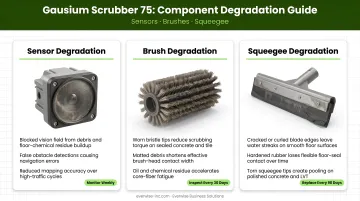
Each of these failures compounds the others. A machine running with dirty sensors, worn brushes, and a fouled squeegee produces cleaning results that fall well below commercial-grade standards — while still consuming the same operating hours and labor oversight.
Safety, Hygiene, and Compliance
In regulated environments, a poorly maintained scrubber creates real compliance exposure:
- Healthcare: CDC guidance requires inpatient floors cleaned at least once daily, with ICU floors cleaned twice daily. A malfunctioning scrubber in a hospital creates both a service gap and a direct infection control risk.
- Food service: The FDA Food Code 2022 requires indoor food facility floor surfaces to be cleaned as often as necessary to remain clean. Equipment failures here can trigger regulatory consequences.
- All facilities: OSHA requires walking-working surfaces to be maintained clean and sanitary. A scrubber that navigates erratically also poses collision risks in busy facilities.
Types of Maintenance for Robotic Floor Scrubbers
Effective maintenance combines four distinct types, each serving a specific role in keeping your robotic scrubber running reliably.
Routine / Preventive Maintenance
This is the foundation. Daily and post-use tasks take 5–15 minutes and prevent the majority of operational failures.
After every use:
- Empty and rinse the recovery tank (sludge hardens and causes odor)
- Remove and wash brushes thoroughly
- Wash and dry squeegees; store them elevated to prevent blade deformation
- Wipe LiDAR units, cameras, and sensors with a clean, soft, dry cloth
- Confirm battery is charging
Monthly preventive tasks:
- Inspect water pipes and hoses for leaks; tighten loose fasteners
- Lubricate pivot points and moving parts with manufacturer-approved lubricant
- Replace worn consumables — squeegees, filter bags, brushes — based on condition
- Flush the solution tank with approximately three gallons of hot water mixed with an approved cleaning solution to prevent sediment and odor buildup
- Wipe machine exterior with a damp cloth; avoid contact with sensing components
Corrective / Reactive Maintenance
Corrective maintenance becomes necessary when something fails. Common triggers include:
- Robot stops completing its cleaning route
- Brush motor fails to engage or makes abnormal sounds
- Battery no longer holds a full charge
- Squeegee damage causes visible streaking despite cleaning
- Sensor errors appear repeatedly and won't clear
Each of these failures carries a real cost. In a high-use facility, a breakdown during an overnight route means missed cleaning, staff reassignment to manual work, and repair bills that exceed what preventive service would have cost. Deloitte estimates that poor maintenance strategies can reduce productive capacity by 5% to 20% — a significant drain on any operation.
Predictive / Condition-Based Maintenance
Gausium's Smart Cloud Platform gives facility managers continuous visibility into machine health — including diagnostics, consumables status, and operational analytics — so maintenance decisions are based on actual data, not guesswork. The Gausium Mobile App extends that visibility remotely, allowing managers to check cleaning status and machine condition without being on-site.
This built-in capability supports condition-based scheduling — adjusting maintenance timing based on actual usage data rather than fixed calendar dates. For Texas facilities running Gausium scrubbers, Everwise Business Solutions' service technicians can help interpret these monitoring outputs and build a maintenance schedule around what the data actually shows — rather than defaulting to one-size-fits-all intervals.
Major / Overhaul Maintenance
Where predictive monitoring tells you when to act, a major overhaul addresses how thoroughly the machine needs attention. Deep servicing goes beyond routine care and typically includes:
- Battery health assessment
- Drivetrain and bearing inspection
- Full sensor, LiDAR, and camera calibration and realignment
- Firmware and software updates (Gausium supports over-the-air updates)
- Cable and wiring inspection
- Complete functional test against original performance specs
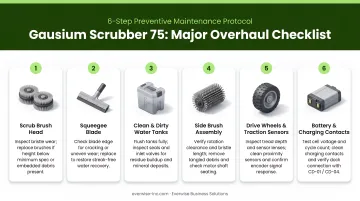
Schedule a major overhaul outside the regular interval after a significant collision, when recurring minor issues suggest systemic wear, or when cleaning output keeps declining despite fresh consumables and routine upkeep. For specific overhaul intervals for your Gausium model, contact Everwise Business Solutions directly — interval recommendations vary based on usage intensity and environment.
Signs Your Robotic Floor Scrubber Needs Maintenance
Degraded Cleaning Performance
These output-based signals indicate a maintenance issue is already affecting results:
| Symptom | Likely Cause | First Step |
|---|---|---|
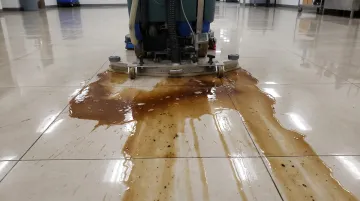
| Streaks or puddles after cleaning | Worn, dirty, or misaligned squeegee | Clean squeegee; check blade condition and installation |
| Missed zones or incomplete routes | Sensor obstruction or mapping error | Wipe sensors; review route map in software |
| Excessive foam or poor water recovery | Blocked filters or tank issue | Inspect and clean filter elements; check hoses |
| Robot stopping mid-route | Brush motor strain, dirty sensors, or battery depletion | Check error log; inspect sensors and battery charge |
| Longer cleaning times for the same area | Brush wear or navigation recalculation | Inspect brush condition; review sensor cleanliness |
Unusual Sounds, Errors, and Physical Indicators
Auditory and physical warning signs:
- Grinding or rattling during operation — debris in brush assemblies or bearing wear
- Squeegee drag or scraping sounds — blade misalignment or damage
- Visible grime on sensors, LiDAR units, or cameras
Digital warning signs to take seriously:
- Sensor obstruction alerts
- Tank overfill or water system errors (bent/blocked hoses, dirty filters)
- Charge failure notifications
- Mapping or positioning errors
Never repeatedly reset an error code without addressing the root cause. Persistent inability to auto-clean can stem from sensor obstruction, Emergency Stop activation, or abnormal positioning status — and each of those causes requires a different fix.
Increased Resource Use and Recurring Downtime
Two patterns that signal deeper problems:
If the Scrubber 75's run time is shrinking below its rated 4–6 hours per charge, a battery health assessment is overdue — not another charge cycle.
When the same issue resurfaces within days of a quick fix, the underlying cause hasn't been addressed. A sensor that re-fouls immediately, or an error code that reappears next cycle, needs a qualified technician — not another reset.
Robotic Floor Scrubber Maintenance Schedule
Maintenance frequency scales with usage intensity. A hospital or manufacturing facility running across two or three shifts daily needs more frequent intervention than an office building on a single light-use cycle. Treat Gausium's service manual as the primary reference; this table is a general framework.
| Frequency | Tasks | Why It Matters |
|---|---|---|
| Daily / Per-Use | Empty and rinse recovery tank; clean brushes and squeegees; wipe sensors, LiDAR, and cameras with soft dry cloth; check battery charge; verify water tank is clean and filled | Prevents sludge buildup, odors, navigation failures, and blade damage — the majority of operational failures trace back to skipped daily steps |
| Weekly | Inspect hoses and water connections for leaks; review error log for recurring alerts; check squeegee blade condition and alignment; confirm route map integrity and cleaning schedule in software | Catches developing issues before they become failures; recurring error codes at this stage are a clear signal to act |
| Monthly | Replace worn consumables as needed (squeegees, filter bags, brushes); lubricate pivot and moving parts with manufacturer-approved lubricant; flush solution tank; inspect charging dock; wipe exterior surfaces | Consumable wear is gradual — monthly inspection catches wear before it affects performance |
| Quarterly / Every 250–500 Operating Hours | Schedule a preventive maintenance visit: drivetrain inspection, firmware update, full sensor and camera calibration, filter element replacement, battery health check | High-demand facilities target the 250-hour end; light-use facilities can extend toward 500 hours; Gausium's built-in diagnostics help determine the right interval for your facility |
| Annual | Complete system audit: cable and wiring inspection, battery replacement assessment, operating history review, route optimization, full functional test against original performance specs | Confirms the machine still meets its original capabilities and identifies components approaching end of life before they cause unplanned downtime |
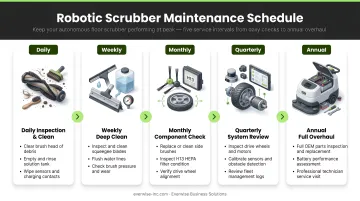
Not sure which interval applies to your facility? Gausium's built-in diagnostics provide usage data to guide that decision — or contact Everwise Business Solutions for a maintenance assessment tailored to your operation.
Conclusion
A structured maintenance plan isn't optional — it's what determines whether a robotic floor scrubber delivers on its investment or becomes a source of recurring costs and operational headaches. Preventive care, early fault detection, and scheduled professional servicing work together to protect both machine performance and long-term asset value.
For Texas businesses running Gausium autonomous cleaning robots, Everwise Business Solutions offers maintenance services backed by technicians trained on Gausium's full product line. Whether you need routine service, troubleshooting support, or help building a condition-based maintenance program around your Gausium diagnostics, the team is available Monday through Friday, 9:00 AM to 6:00 PM. Reach out at 210.884.0559 or german.zavala@everwise-inc.com to get started.
Frequently Asked Questions
How often do robotic scrubbers need maintenance?
Light operator maintenance takes 5–15 minutes per use and should happen after every cleaning cycle. A more detailed inspection is warranted weekly, and a scheduled preventive maintenance visit should be planned quarterly or every 250–500 operating hours depending on usage intensity and your manufacturer's guidelines.
What common mistakes can damage a robotic scrubber?
A few habits cause the most damage over time:
- Skipping recovery tank cleaning after each use, which leads to sediment hardening and foul odors
- Leaving sensors unwiped, causing navigation failures
- Storing the machine with tanks closed and wet, encouraging mold growth
- Using non-approved cleaning solutions that corrode components or clog filters
What parts need the most frequent attention?
Brushes and squeegees require cleaning after every use and condition inspection weekly. Sensors, LiDAR units, and cameras need wiping after every session. Water tanks should be drained, rinsed, and left open to air-dry after each use.
How do I know when to replace brushes or squeegees?
Replace brushes when bristles are visibly worn, frayed, or no longer making full contact with the floor surface. Replace squeegees when they leave streaks, water trails, or uneven drying patterns despite being clean and correctly aligned. Consult your Gausium manual for any usage-hour replacement thresholds specific to your model.
Can I use any cleaning solution in my robotic floor scrubber?
Only manufacturer-approved solutions should be used. Non-approved detergents can produce excessive foam that disrupts water recovery, leave residue that clogs filters, or degrade internal tank components over time. Always verify solution type and dilution ratio in your machine's manual before use.
How long does a robotic floor scrubber last with proper maintenance?
With consistent preventive maintenance, a commercial robotic floor scrubber typically delivers reliable performance for 5–7 years or more. Lifespan depends on usage intensity, operating environment, and how closely you follow the manufacturer's maintenance schedule. Skipping maintenance shortens service life and increases total cost of ownership.