Introduction
Professional cleaning robot sales grew 34% to more than 25,000 units globally in 2024, according to the International Federation of Robotics. That number keeps climbing, with retail floors among the busiest deployment environments driving growth.
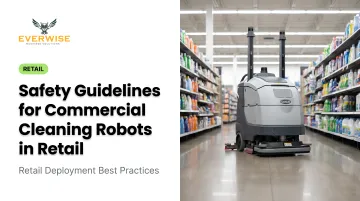
The challenge retail presents is distinct. Unlike warehouses or hospital corridors, retail spaces mix autonomous robots with people who have no training, no briefing, and no warning: shoppers, children, elderly customers, and seasonal staff who may have never seen a cleaning robot operate. That combination creates a safety profile you cannot solve with machine capability alone.
Commercial cleaning robots are not inherently dangerous. The risk is operational — most incidents trace back to deployment decisions, staff preparation, and whether safety checks became routine or disappeared.
This guide covers the practical side of retail robot safety, not technical specifications, so district managers and facility operators can put a workable framework in place before a robot ever reaches the sales floor.
Key Takeaways
- Commercial cleaning robots carry low-to-moderate risk in retail — only when properly certified, configured, and actively managed
- Verify IEC 63327 (international) or CSA/ANSI C22.2 No. 336 compliance before purchasing or deploying any unit
- Configure exclusion zones for checkout queues, store entrances, and fitting room corridors before first use
- Schedule operation outside peak hours; add direct staff oversight if daytime cleaning is required
- Run pre-operation checks daily, orient all floor staff, and reassess robot paths after any layout change
Safety Guidelines for Commercial Cleaning Robots in Retail
Safe retail robot deployment requires three things working together: the right machine, correctly configured for your store, with consistent human protocols behind it. Miss any one of those, and the remaining two will not compensate.
The primary risks are operational and environmental, not mechanical. OSHA notes that many robot-related incidents occur during non-routine conditions — setup, adjustment, or deviation from standard operating procedures — rather than from equipment malfunction during normal use. In retail, "non-routine" happens constantly: seasonal resets, new promotional displays, a wet floor near the deli counter, a toddler crouching between cart return lanes.
General Safety Precautions
Who can interact with the robot during operation matters legally. Only trained, authorized personnel — a designated floor supervisor or facilities lead — should adjust, pause, or respond to the robot while it is running. General staff and shoppers are not authorized. This boundary matters for liability, not just safety.
Every staff member working in robot-active zones needs a basic orientation covering:
- What the robot will and will not do autonomously
- How to activate the emergency stop function
- What to do when the robot behaves unexpectedly
- Who to contact if an issue cannot be resolved immediately
Post clear wet floor signage in all active cleaning zones. Slip, trip, and fall injuries are the third most common cause of lost-workday injuries in wholesale and retail trade, with 75% occurring on the same level — exactly where a scrubbing robot leaves a wet trail. Signage reduces the risk that a shopper's fall gets attributed to a robot that was actually operating correctly.
Safety During Deployment and Initial Setup
Before activating any robot in a live retail space, walk the floor with a critical eye.
Pre-deployment floor audit checklist:
- Identify fixed hazards: steps, ramps, floor drains, cable runs, mat edges
- Remove or mark temporary hazards outside the robot's detection capability
- Confirm the store layout has been mapped into the robot's navigation system
- Program exclusion zones for checkout queues, fitting room corridors, and store entrances
- Restrict high-traffic zones from autonomous routes during opening and closing windows
- Verify the emergency stop is functional before every single deployment
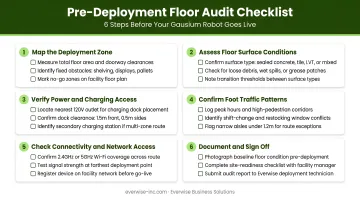
Do not proceed if any sensor indicator, navigation warning, or battery alert is active. A partially impaired robot in a live retail environment creates greater liability than delaying the run entirely. The robot's safe-operation logic assumes all systems are functioning — disabling a sensor or ignoring an alert removes a safeguard the system was designed to rely on.
Safety While Operating in a Live Retail Environment
Assign a monitoring role for every active cleaning session. Someone needs to know the robot is running and be positioned to intervene.
Robots with multi-sensor navigation — 3D depth cameras and AI-based obstacle detection, for example — reduce incident frequency. The Gausium Omnie and Gausium PhanShop use this approach. Even so, they do not eliminate the need for human awareness on the floor.
When to schedule operation:
- Best window: before store opening or after closing
- Daytime use: program reduced-speed zones in high-traffic areas
- Avoid peak periods (holiday rush, back-to-school) without additional oversight protocols in place
One instruction matters more than most retail managers expect: never manually push or redirect the robot while it is in autonomous mode. If the robot needs to be repositioned, pause it via the control interface first. Bypassing this step is a documented cause of sensor errors and unpredictable movement patterns.
Environmental and Floor Condition Considerations
Retail floors are not static. Food service spill zones, tracked-in moisture from weather, seasonal mats, and temporary promotional fixtures all create conditions the robot may not navigate safely — even if it handled the same space flawlessly the week before.
Run a pre-operation floor check every shift to confirm:
- No active spills or wet areas outside the robot's operational path
- Floor surface matches what the robot is configured for (a scrubber on a freshly waxed surface, or a hard-floor unit pushed into a carpeted zone, creates immediate risk)
- No new fixtures, signage bases, or product pallets placed since the last mapping session
The environment can also degrade sensor performance. Research from NIST confirms that highly reflective surfaces can distort sensor data, and peer-reviewed research on LiDAR systems has shown that mirror-like objects can cause faulty maps or return no range data at all. Polished retail tile, glass display cases, and mirrored fixtures are real-world versions of this problem.
Validate detection performance in those zones before assuming the robot's navigation will handle them correctly. Direct sunlight through floor-level windows introduces a separate variable — it can interfere with both camera and LiDAR-based obstacle detection. Confirm your store's actual conditions match the robot's operating environment specifications before each shift, particularly in locations with large storefront windows or skylights.
Every one of these environmental factors is manageable with the right pre-shift routine. The stores that have the fewest robot-related incidents are the ones that treat floor checks as non-negotiable, not as optional prep steps.
Compliance Standards Every Retail Operator Should Know
Two standards govern commercial robotic floor cleaning machines in the markets most relevant to Texas retail operators:
| Standard | Issuer | Scope |
|---|---|---|
| IEC 63327:2021 | IEC | Commercial indoor floor treatment machines — sweeping, scrubbing, autonomous operation near the public |
| CSA/ANSI C22.2 No. 336-17 (R2022) | CSA Group | Rechargeable battery-operated commercial robotic floor treatment machines with traction drives (North American reference; published 2017, reaffirmed 2022) |
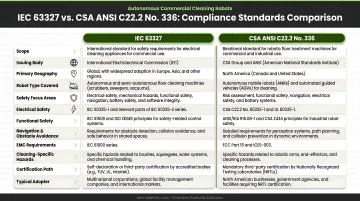
IEC 63327 explicitly covers machines operating near large groups of people in environments such as shopping malls. CSA/ANSI C22.2 No. 336 is the North American product-category standard your procurement team and insurer will most likely reference.
These are the standards your robot should be certified against. ISO 10218-1:2025, which some operators mistakenly reference, covers industrial robots and explicitly excludes service robots and consumer products where the public can have access. It does not apply to commercial cleaning robots in retail.
What Certification Actually Means
Third-party certification (from bodies such as UL Solutions, TÜV SÜD, or Intertek) carries more weight than a manufacturer's self-declaration. Independent testing bodies verify that a specific model meets the applicable standard requirements and issue documentation you can present to regulators or insurers if an incident occurs.
When evaluating a robot, request and verify:
- Confirm the certification report references IEC 63327 or CSA/ANSI C22.2 No. 336
- Identify the certifying body (UL, TÜV SÜD, Intertek, or equivalent)
- Check that your specific model number is covered within the certificate
- Verify the certificate in the issuing body's public database
Store this documentation alongside your other facility safety records before deployment begins. Your vendor should provide these documents without hesitation — Everwise Business Solutions, the authorized Gausium distributor for Texas, supplies compliance documentation as part of the procurement process for every Gausium robot model. If a vendor cannot produce certification records, that's reason enough to keep looking.
Common Safety Mistakes to Avoid
Most retail robot incidents are preventable. These are the patterns that show up repeatedly:
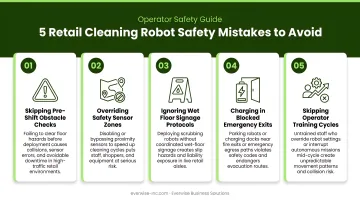
- Running factory default settings on a live floor — every retail environment has different aisle widths, queue densities, and seasonal layouts. Run a site-specific configuration before the robot operates in a live space.
- Assuming obstacle detection covers everything — sensors have rated ranges and documented blind spots. Reflective floors, glass cases, crouching children, and small bags on the ground all create gaps that human oversight is there to catch.
- Ignoring early warning alerts — low battery warnings, sensor calibration errors, and brush system faults are early indicators of conditions that precede more serious failures. A robot displaying active alerts should not keep operating in a public space.
- Skipping staff training because the robot is "autonomous" — autonomy means the robot navigates without being driven, not that it requires no human involvement. Staff who can't safely pause, redirect, or report a malfunctioning robot increase the overall risk level.
- Not reassessing after layout changes — seasonal resets, new shelving, promotional fixtures, and construction zones all alter the environment the robot was originally mapped to. Operating in a layout it wasn't configured for is one of the most preventable retail robot mistakes, and one of the most frequently overlooked.
Conclusion
Safety with commercial cleaning robots in retail is a shared responsibility. The robot's certification handles one part. Your store's deployment configuration handles another. The daily discipline of your staff handles the third. None of these elements works in isolation.
Treat pre-operation checks as part of the daily opening routine — not a one-time setup task that fades after the first week. When evaluating robots for your Texas retail locations, prioritize models with documented IEC 63327 or CSA/ANSI C22.2 No. 336 compliance and work with distributors who can provide that documentation, walk your team through proper configuration, and support you when safety questions arise.
Everwise Business Solutions, the authorized Gausium distributor for Texas, provides technical training, preventive maintenance contracts, and on-demand support for retail deployments across San Antonio, Dallas, Houston, Austin, and the Rio Grande Valley, including retail-specific models like the Gausium PhanShop and Gausium Omnie. Contact their team at 210.884.0559 or german.zavala@everwise-inc.com.
Frequently Asked Questions
What safety guidelines should I follow for commercial cleaning robots in retail?
Start with these three actions:
- Verify the robot carries IEC 63327 or CSA/ANSI C22.2 No. 336 compliance documentation
- Configure exclusion zones for checkout queues and high-traffic aisles
- Schedule operation outside peak hours whenever possible
Ensure all staff in robot-active zones know how to safely stop the robot and who to contact if it malfunctions.
Are commercial cleaning robots safe for use in retail stores?
Yes, when deployed correctly and operated within certified parameters. Retail environments require additional precautions because shoppers — including children — share the space with the robot in ways that controlled warehouse or industrial settings do not.
Which standard covers robot safety for commercial cleaning equipment?
ISO 10218-1:2025 covers industrial robot safety but explicitly excludes commercial service robots in public-access environments. For commercial cleaning robots in retail, the applicable standards are IEC 63327 (international) and CSA/ANSI C22.2 No. 336-17 (North America).
Do retail staff need training to work alongside cleaning robots?
Yes. Staff in robot-active zones need a basic orientation covering emergency stop procedures, status indicator meanings, and escalation contacts. Untrained staff who can't intervene safely are a greater liability than the robot itself.
What should I do if a cleaning robot malfunctions in my store?
Use the emergency stop function immediately and prevent shoppers and staff from approaching the unit. Contact the manufacturer or authorized distributor for guidance before resuming operation — do not attempt to diagnose or override the robot without technical support.
How often should commercial cleaning robots be inspected for safety?
Run a pre-operation check before each use covering sensors, emergency stop function, battery status, and active alerts. Conduct a thorough monthly review, then follow the manufacturer's recommended schedule for full preventive maintenance — typically quarterly or semi-annually based on usage.